Private Mac dictation
Vox keeps your voice work local.
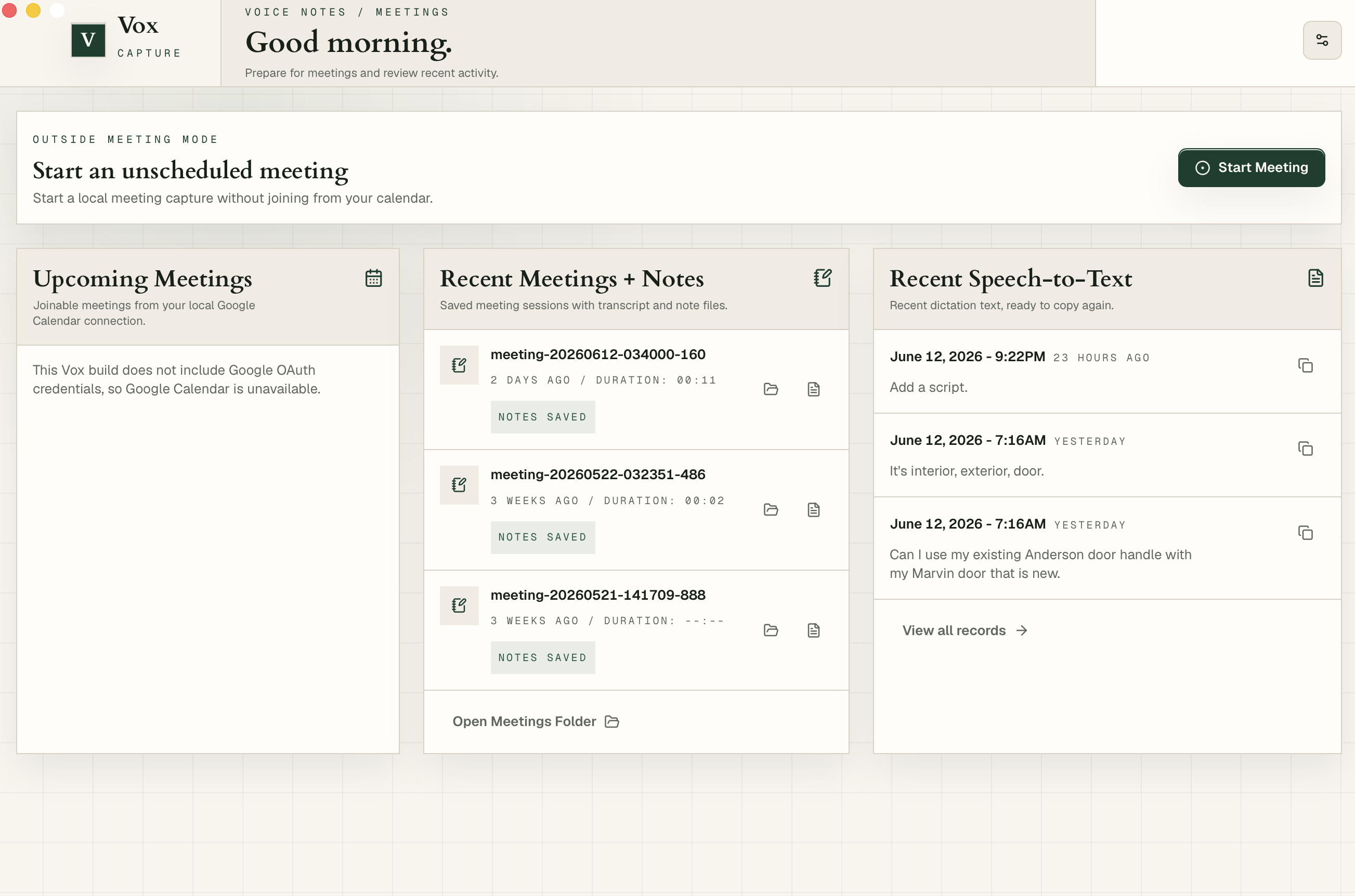
Dictate into any app, record a call without inviting a bot, and keep the transcript, notes, and follow-ups as Markdown on your Mac. Your data stays your data.
Why Vox exists
Better work tools should not require handing over the work.
I'm Bill. I wanted one tool that helped me transcribe, take notes, and stay sharper at work — without handing my information to someone else's server. No bot in every meeting. No hosted workspace full of half-formed thoughts.
The existing options always felt like a compromise: meeting bots that change the social dynamic of a call, hosted transcription that turns personal work into someone else's database, and AI tools that assume everything should flow through a cloud workspace. I wanted something quieter.
The bigger belief is that a lot of the best future work software will run locally, save to simple formats, and integrate cleanly with the agents people choose. A good tool adapts to your world, performs its job, and leaves the record in your hands. Vox is my first serious bet in that direction.
What Vox does
Voice, meetings, and notes in one local loop.
Speak into any app
Use a global shortcut, dictate a thought, and put clean text exactly where you are already working.
Turn calls into records
Capture microphone and system audio locally, then keep transcripts, notes, and follow-ups on disk.
Build a local work memory
Your useful context becomes files you can search, edit, version, and hand to the tools you choose.
Private by architecture
The useful stuff stays where you can see it.
Audio stays on your Mac
Recording, transcription, and note generation all happen on your machine. Audio files never leave your disk unless you choose to move them.
Markdown is the source of truth
The output is readable and portable. You can keep it in a folder, a repo, an editor, or your own workflow.
The server boundary is narrow
The web service handles exactly four things: billing, license codes, app downloads, and account login. It never sees your audio, transcripts, notes, or calendar data.
AI is a choice
Vox does not default to any cloud AI. Use on-device features alone, configure your own endpoint, or skip summaries entirely. You decide.
Pricing
Start free. Pay when Vox becomes a default.
Every plan keeps transcription local. Paid plans unlock the daily-use limits for dictation and local meetings.
Free $0 free
Explore the full local workflow. No card required.
- 1 meeting recording (one-time)
- 30 sec/day dictation (resets daily)
- Calendar launcher
- Local Markdown notes
Annual $59 per year
Most popular
For daily dictation, recurring meetings, and a year of local voice work.
- Unlimited dictation
- Unlimited local meetings
- Markdown transcripts and notes
- License code for two machines
Lifetime $89 one time
Pay once and keep Vox Pro.
- Unlimited dictation
- Unlimited local meetings
- Lifetime Vox updates
- License code for two machines
Questions
Frequently asked questions
What happens after my one free meeting?
The free meeting is a one-time allowance. Dictation (30 seconds per day) resets daily and continues working after the meeting is used. Upgrading unlocks unlimited meetings and dictation.
Does Vox join my meeting as a bot?
No. Vox captures audio from your Mac's microphone and system audio. No one in the meeting sees anything — no calendar invite, no bot avatar, no notification.
How is Vox different from Otter, Granola, or Fireflies?
Most meeting-notes tools work by either joining your call as a bot or uploading your audio to a cloud service for processing. Vox takes a different approach: it records from your Mac, transcribes locally using Whisper, and saves everything as Markdown files on disk. Nothing is uploaded, no bot appears, and you own the files.
What does 'bring your own endpoint' mean?
You can optionally connect Vox to any AI endpoint (Claude, OpenAI, a local model server) for summaries and follow-ups. This is entirely optional — Vox works without it.
Can I get a refund?
Yes. Email [email protected] within 30 days of purchase for a full refund, no questions asked.
How many Macs can I use Vox on?
Both Annual and Lifetime plans include a license for two machines.
What happens to my files if I stop paying?
All your files stay on your Mac. They are Markdown files in a folder you control. Vox never deletes, locks, or uploads your data. The paid subscription only unlocks usage limits in the app.
Does Vox work offline?
Yes. Transcription, dictation, and meeting recording work without an internet connection. You only need connectivity for the initial download, license activation, and if you choose to use a remote AI endpoint.
Is there a free trial for the paid plans?
There is no time-limited trial. Instead, the free tier is permanent and lets you experience the full local workflow. If Vox fits how you work, upgrade when you are ready.
Available now for Apple silicon Macs
Start speaking.
Download Vox, set a shortcut, and start speaking. Your voice stays on your Mac, your notes stay in your files, and you keep control of everything.